The macOS app
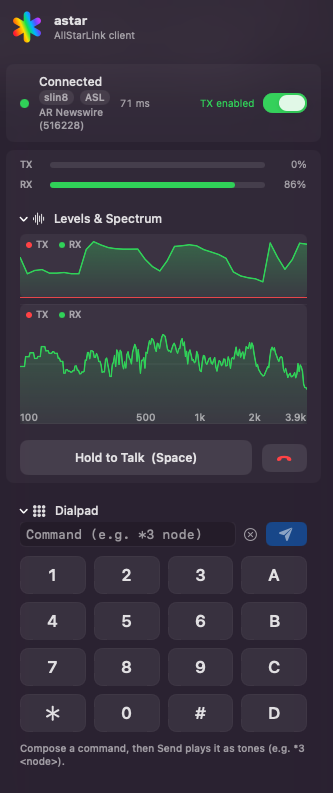
astar on macOS is a menu-bar app that also, by default, shows up in the Dock and in Cmd-Tab. After launch, look for the rainbow asterisk in the menu bar — the product mark, a six-spoke asterisk, not a five-pointed star. Left-click opens the dial popover; everything the client does happens there or in Settings.
To run it without a Dock icon, right-click the asterisk and turn off Show in Dock. It takes effect immediately and persists across launches.
Download astar.dmg First run walkthrough
Requirements
macOS 13 (Ventura) or later. The deployment target is set in
apps/macos/project.yml and in AstarCore's Package.swift; the SwiftUI
APIs the app uses that need it include ViewThatFits, in the status row.
Building it also needs a full Xcode; see
Build it from source.
What is in the popover
The popover is the whole client. In broad strokes:
- Network picker — AllStarLink or M17.
- Dial field — a node number or an address, plus favorites and recents.
- Connect / Disconnect, with call state and round-trip time.
- Push to talk — press-and-hold in the UI, a hardware operator key on a USB radio interface, or VOX. Also a TX disabled — listening only mode when you want to monitor without any chance of keying.
- Dialpad for DTMF commands to the far end.
- Quick settings — input and output device, gains, VOX threshold and hang time, codec, talk timer.
- Level meters and spectrum for what you are sending and receiving.
Settings adds the rest: your AllStarLink account, saved configs ("setups"), microphone profiles and characterization, serial PTT wiring, and device selection.
The running version is shown in the popover footer, so you can always tell what you are looking at.
Networks
| Network | Notes |
|---|---|
| AllStarLink (IAX2) | The primary target. Dials nodes; speaks the app_rpt link-layer dialect on top of IAX2. |
| M17 | Native support, including reflectors. Transmits your callsign, so set it before you key. The app links Codec 2 in, so there is nothing to install; a system libcodec2 is used in preference when one is present — see Codec 2. |
| D-Star (needs a dongle) | XLX/XRF reflectors over DExtra. Voice is AMBE+2, which runs on a hardware vocoder dongle — there is no software alternative, so the network appears in the picker only while one is attached. See Digital voice. |
Audio and PTT hardware
astar targets the generic class of USB radio interfaces — serial PTT plus USB audio. The AllScan UCI150 is the reference device, not a special case. The Hardware page covers the macOS driver situation and how the PTT lines are wired.
What these docs cover
Install and hardware setup, and a stub for day-to-day operating — see Using astar. Detailed usage documentation has not been written yet.